![ctel-logo-clean-3.png]](https://kb.ctelecom.net/hs-fs/hubfs/ctel-logo-clean-3.png?height=50&name=ctel-logo-clean-3.png)
Yealink Device Steps
- Determine the IP of the Phone and navigate to the IP via a browser.
- The default username/password is admin/admin
- PHONE: Navigate to the "Upgrade tab" and to the "advanced" sub-tab.
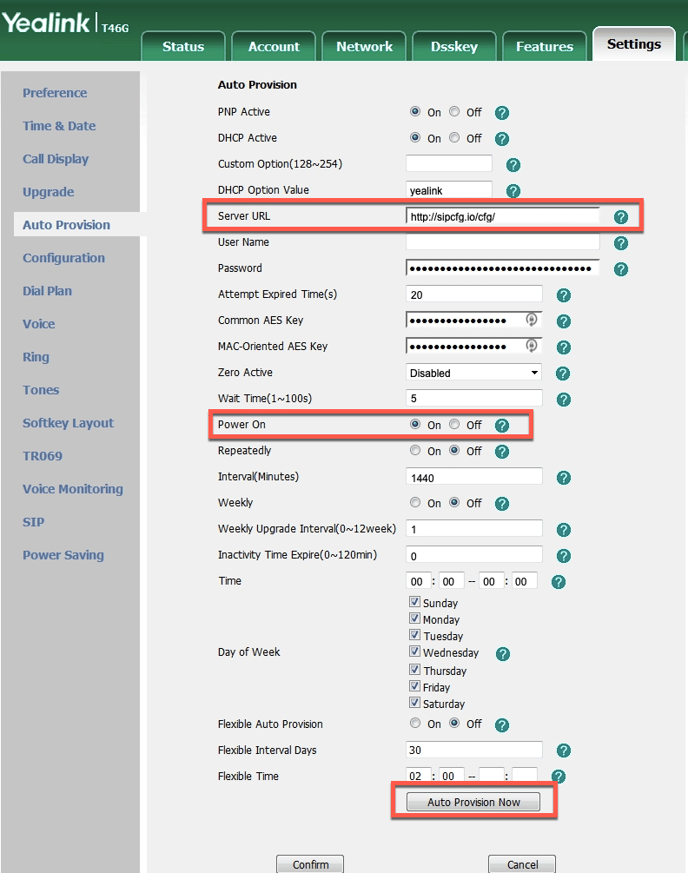
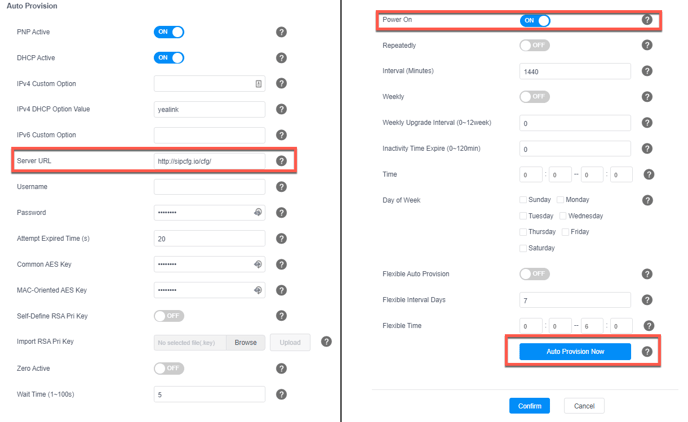
- WEB GUI: Navigate to "Settings" and "Auto Provision" on the side menu.
- Set "URL" to match this domain syntax, http://sipcfg.io/cfg/
- Ensure "Power on" is set in the "Check New Config" field.
- Click on Auto Provision.
- Once the device is on Ctel UCS, the password will be updated. Please ask our support team for assistance.
How to factory reset a Yealink phone:
Hold the [ OK ] button down for 10 seconds performs a factory reset.
Holding the [ X ] button for 5 seconds will power cycle the device.